
Not every modernization program starts with a full public cloud migration. For many engineering organizations, the hardest systems to move are the ones closest to operational reality: databases that sit near factories, hospitals, stores, regional offices, regulated environments, or latency-sensitive applications.
Microsoft’s announcement that SQL Server on Azure Local is now generally available gives those teams another modernization path. Instead of framing database modernization as an all-or-nothing move to the cloud, it supports a more practical question: where should this data live today, and how do we modernize it without increasing risk?
Context: Hybrid Modernization Is Becoming the Default for Complex Portfolios
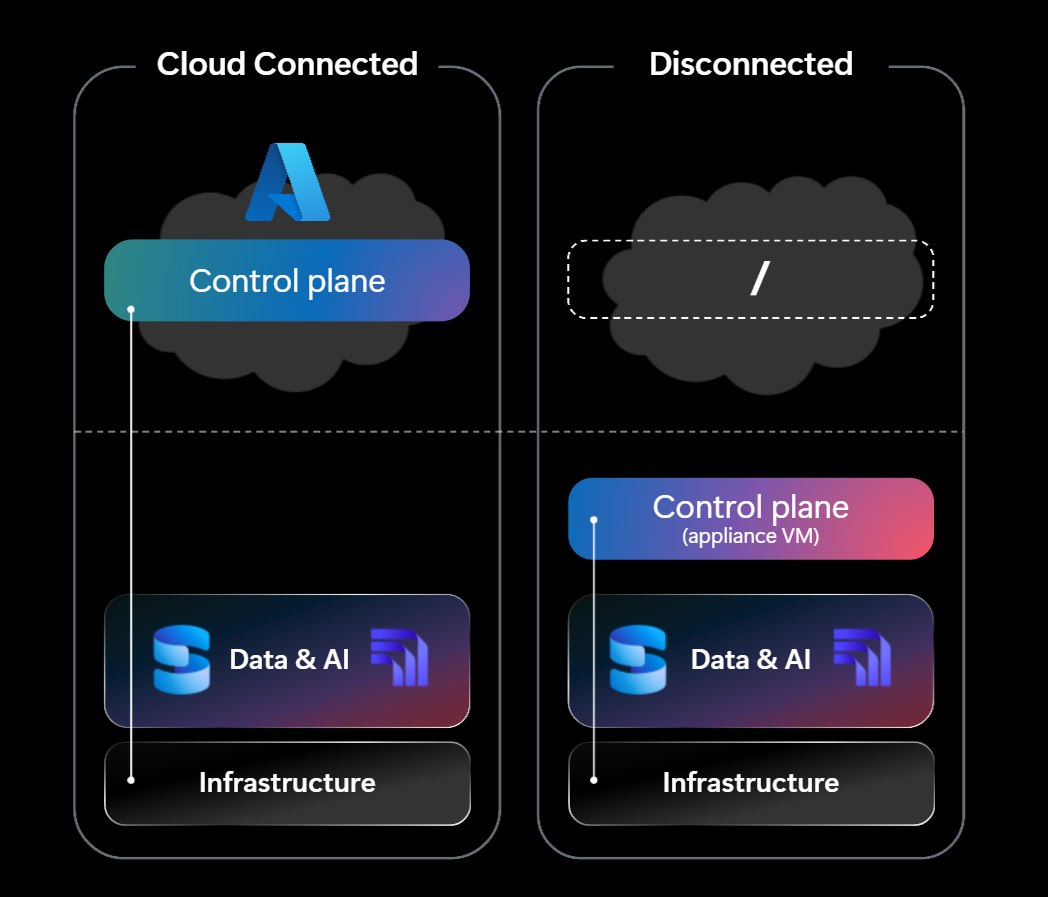
Modernization roadmaps often look simple in strategy decks: inventory applications, prioritize business value, migrate to cloud, decommission legacy infrastructure. In practice, databases complicate that plan.
Data gravity, compliance requirements, network latency, local operational dependencies, and business continuity needs can all prevent a clean lift-and-shift. Some systems cannot tolerate intermittent connectivity. Others must keep data in specific locations for regulatory or contractual reasons. Some applications are so tightly coupled to on-premises infrastructure that moving the database first would create more risk than value.
That is why hybrid modernization has become a serious architectural pattern rather than a temporary compromise. Organizations want cloud operating models, centralized management, improved resilience, and modernization momentum, but they may still need workloads to run in controlled local environments.
Microsoft’s Azure Blog positions SQL Server on Azure Local as a way for customers to “modernize where their data resides.” That wording matters. It acknowledges that modernization is not only about moving data to a hyperscale region. It is also about improving manageability, security posture, lifecycle discipline, and platform consistency wherever the workload must run.
What SQL Server on Azure Local Means for Modernization Teams
SQL Server on Azure Local reaching general availability is significant because it gives organizations a supported option for running SQL Server in local infrastructure scenarios while aligning with Azure’s hybrid cloud direction.
The service is aimed at organizations that need more control over infrastructure, connectivity, and data placement. That includes enterprises operating in regulated industries, distributed physical environments, edge locations, and mission-critical facilities where database proximity affects application performance or operational continuity.
For CTOs, the important point is not simply that another deployment target exists. It is that database modernization can now be planned with more nuance. Teams can evaluate whether a workload should move to Azure public cloud, remain on traditional infrastructure temporarily, or modernize onto Azure Local as part of a staged transition.
This is especially relevant for SQL Server estates that have grown over many years. Many organizations still run critical workloads on aging Windows Server and SQL Server environments, sometimes with unclear ownership, inconsistent patching, manual backup routines, or hardware refresh risk. A hybrid target can help reduce those risks without requiring every dependency to be untangled at once.
Why “Where Data Resides” Is a Modernization Decision
Data placement is no longer just an infrastructure concern. It affects application architecture, compliance strategy, developer velocity, observability, incident response, and cost control.
Latency and operational proximity
Some applications need to process data close to where events happen. Manufacturing lines, logistics hubs, retail systems, healthcare facilities, and energy operations may all depend on low-latency access to local databases. Moving those workloads to a remote cloud region can introduce unacceptable performance variability, even if the application is technically cloud-compatible.
A hybrid database option allows teams to modernize the management and lifecycle of the platform while keeping the database close to the business process it supports.
Compliance and data sovereignty
Regulatory requirements can dictate where data is stored, who can access it, how it is protected, and how it is audited. For some organizations, public cloud regions may be acceptable for certain datasets but not others. For others, approval timelines may lag behind technical readiness.
SQL Server on Azure Local gives teams another option when they need to demonstrate stronger control over data placement while still moving toward a more modern operating model.
Connectivity and resilience
Cloud-first architectures assume reliable connectivity. Many real-world environments cannot. Remote sites, constrained networks, industrial locations, or regions with inconsistent connectivity may need local database availability even when external links are degraded.
Hybrid modernization helps separate two goals that are often conflated: adopting cloud-aligned management practices and depending entirely on cloud connectivity for runtime operations.
The Broader Cloud Context: Data Modernization Is Fragmenting, Not Simplifying
Microsoft is not alone in recognizing that modernization is becoming more distributed. Recent AWS announcements show a similar industry trend: cloud platforms are expanding options for how teams manage, analyze, and optimize data across increasingly complex environments.
For example, AWS announced the public preview of the AWS Well-Architected Agent, an AI-powered service intended to analyze AWS environments and deliver targeted recommendations. AWS also announced expanded support for Apache Iceberg V3 data types in Amazon S3 Tables, and Amazon Aurora PostgreSQL support for directly querying Apache Iceberg and Parquet data in a data lake alongside operational data. These updates point to the same larger reality: modern data architecture is no longer a single database in a single location.
Meanwhile, Microsoft’s related Azure infrastructure messaging around responsible hyperscale hardware lifecycle management highlights another part of the modernization equation: infrastructure decisions now include sustainability, lifecycle planning, and operational efficiency. For CTOs, modernization is not only about features. It is about reducing long-term operational drag.
The takeaway is that database modernization is becoming more flexible but also more decision-heavy. Teams need to evaluate placement, governance, cost, performance, lifecycle, and maintainability together.
Practical Implications for Engineering Teams
SQL Server on Azure Local should not be treated as a default answer for every SQL Server workload. It should be treated as a new option in a modernization decision framework.
1. Segment your SQL Server estate by migration readiness
Start by categorizing databases into practical groups:
- Workloads ready for public cloud migration
- Workloads that need refactoring before migration
- Workloads blocked by latency, compliance, or connectivity constraints
- Workloads that should be retired or consolidated
- Workloads that require local placement for the foreseeable future
SQL Server on Azure Local is most relevant to the third and fifth groups. These are often the databases that stall modernization programs because they do not fit a clean migration pattern.
2. Use hybrid modernization to reduce infrastructure risk
Aging database infrastructure creates risk in several ways: unsupported software versions, fragile hardware, inconsistent backup processes, limited observability, and operational knowledge concentrated in a few people.
Moving an eligible workload to a hybrid platform can be valuable even if the application itself remains largely unchanged at first. The goal is to improve the operating environment while creating space for future application modernization.
This is where software maintenance strategy matters. A database platform change should be tied to version upgrades, patching standards, backup validation, monitoring improvements, and documentation. Otherwise, teams risk recreating legacy problems on newer infrastructure.
3. Review application coupling before choosing a target
Before moving a SQL Server workload anywhere, teams should map its dependencies. Identify application servers, scheduled jobs, linked servers, file shares, reporting tools, identity dependencies, integration endpoints, and downstream consumers.
Hybrid modernization works best when teams understand which dependencies require proximity and which can be decoupled. In many cases, the database may need to stay local, while analytics, reporting, or API layers can move to cloud services over time.
4. Define the operating model early
A common modernization failure mode is treating the target platform as purely technical. Teams decide where the workload will run but do not define who owns patching, monitoring, incident response, backup testing, access management, and cost governance.
For SQL Server on Azure Local, engineering and infrastructure leaders should clarify:
- Who manages the local infrastructure?
- How are SQL Server updates and security patches handled?
- What monitoring tools are authoritative?
- What is the backup and restore testing schedule?
- How are compliance controls documented?
- How does this environment fit into cloud governance policies?
A hybrid platform only reduces risk if the operating model is modernized with it.
5. Treat hybrid as a step, not a parking lot
Hybrid modernization should not become a place where difficult workloads go to be forgotten. For each workload placed on Azure Local, define the strategic intent. Is the goal long-term local operation, eventual cloud migration, application refactoring, regulatory alignment, or hardware risk reduction?
Set review points. Revisit the placement decision as network capabilities, compliance requirements, application architecture, and business priorities change.
What CTOs Should Ask Before Adopting SQL Server on Azure Local
For technology leaders, the general availability announcement is a prompt to revisit database modernization plans. Useful questions include:
- Which SQL Server workloads are blocking our cloud migration roadmap?
- Which databases are constrained by latency, compliance, connectivity, or data placement requirements?
- Where are we carrying the most infrastructure lifecycle risk?
- Do we have SQL Server instances approaching end of support or running on aging hardware?
- Could a hybrid deployment reduce operational risk while preserving local control?
- Do we have the skills and processes to operate a hybrid database environment well?
- How will this fit into our broader modernization roadmap?
The value of SQL Server on Azure Local depends on whether it helps the organization move forward. If it simply preserves the status quo, the business impact will be limited. If it becomes part of a deliberate modernization sequence, it can help teams reduce risk while maintaining operational constraints.
Where Vibgrate Fits In
At Vibgrate, we see modernization as an incremental discipline, not a one-time migration event. Database placement is one of the most important decisions in that discipline because it shapes what teams can safely change next.
For SQL Server estates, a practical modernization plan should combine portfolio discovery, dependency mapping, upgrade readiness, risk scoring, and phased execution. Hybrid options like SQL Server on Azure Local can be especially useful when a workload is too important to leave on aging infrastructure but too constrained to move directly to public cloud.
The key is to avoid treating hybrid as a compromise. Done well, it is a controlled modernization pattern that lets engineering teams improve maintainability, governance, and resilience while respecting real-world constraints.
Conclusion: Modernization Is Moving Closer to the Workload
SQL Server on Azure Local reaching general availability reinforces a broader shift in cloud strategy: modernization is no longer defined only by moving workloads into public cloud regions. It is increasingly about applying modern platforms, practices, and governance wherever the workload needs to run.
For developers, engineers, and CTOs, this creates more options—but also more responsibility. The best modernization strategies will evaluate data placement deliberately, reduce legacy risk incrementally, and keep future migration paths open. Hybrid database modernization is not the end of the cloud journey; for many organizations, it may be the step that finally makes the journey realistic.